How to Build an Effective Internal Linking Strategy for SEO
- By admin
- Aug 17, 2026








Internal linking is one of the most practical SEO techniques available to website owners, yet it is often overlooked.
While backlinks from external websites can help build authority, internal links help search engines discover, understand and connect the pages within your own website. They also help visitors move from one relevant page to another.
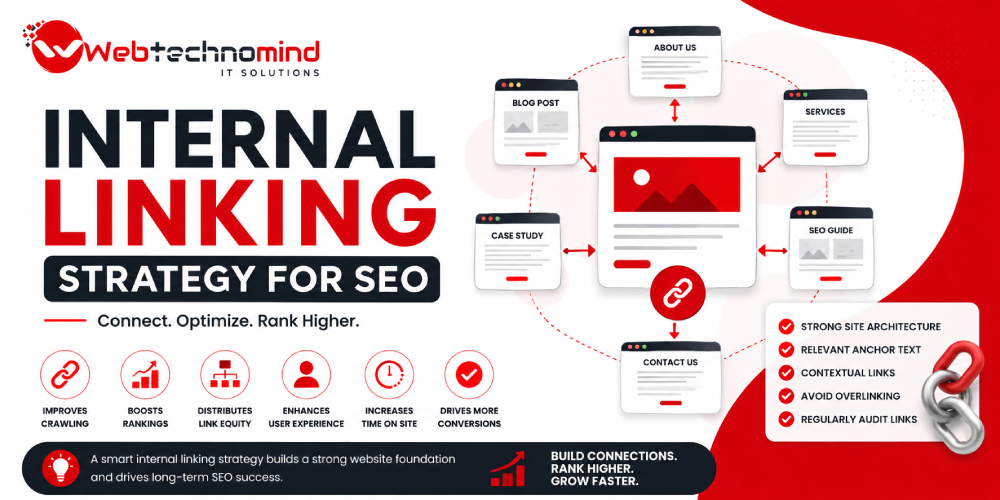
A well-planned internal linking strategy for SEO can improve website navigation, strengthen topical relationships, distribute link equity and help important pages receive more visibility.
In this guide, you’ll learn how to create an effective internal linking strategy that can support your SEO performance in 2026.
An internal link is a hyperlink that points from one page on your website to another page on the same website.
For example, a blog post about technical SEO might link to another article about website speed optimization.
Internal links can connect:
Unlike external backlinks, internal links are completely under your control, making them an important part of your on-page SEO strategy.
A strong internal linking structure provides benefits for both search engines and users.
Search engines use links to discover and crawl webpages. Internal links can help search engines find important pages that might otherwise be difficult to discover.
Links between related pages help communicate how different topics are connected.
For example:
SEO
→ Technical SEO
→ On-Page SEO
→ Off-Page SEO
→ Local SEO
→ International SEO
→ Link Building
This structure creates stronger topical connections across your website.
Some pages naturally receive more external backlinks than others. Internal links can help distribute the value and authority within your website.
Relevant internal links give visitors additional information without requiring them to return to Google and search again.
Strategically linking from high-value informational content to relevant service or product pages can help users move closer to conversion.
Start by understanding what pages exist on your website.
Group pages into logical topics.
For example:
Digital Marketing
This makes it easier to identify which pages should be connected.
Not every page has the same business value.
Identify pages that are important for:
These pages should receive relevant internal links from other authoritative and contextually related pages.
Topic clusters are an effective way to organize related content.
A typical structure includes:
Pillar Page
↓
Supporting Articles
↓
Related Subtopics
For example:
Pillar: Complete SEO Guide
Supporting content:
Each supporting article can link back to the pillar page and other highly relevant articles.
This creates a connected content ecosystem.
Anchor text is the clickable text used in a hyperlink.
For example:
Good:
Learn more about our technical SEO services.
Weak:
Click here to learn more.
Descriptive anchor text gives users a clearer idea of what they will find on the linked page.
However, avoid using the exact same keyword-rich anchor text repeatedly across your website. Keep anchor text natural and varied.
Find pages on your website that already receive significant organic traffic or external backlinks.
These pages can become valuable sources for internal links.
For example, an established blog post ranking well for a competitive keyword may be able to pass internal authority to a newer, relevant page.
Don’t add links simply because a page is authoritative. The destination should always be contextually relevant.
An orphan page is a webpage that has no internal links pointing to it.
These pages can be difficult for users and search engines to discover.
During an internal linking audit, identify orphan pages and determine whether they should:
Important pages should generally not remain isolated from the rest of your website.
Contextual links are links placed naturally within the main content of a page.
They are often more useful than adding a large list of unrelated links at the bottom of an article.
For example, while discussing keyword research, you could naturally link to a detailed guide about how to find low-competition keywords.
The link should make sense within the surrounding paragraph.
Every time you publish a new article, don’t only add links from the new article to older pages.
Go back to relevant older articles and add links to the new content where appropriate.
This creates a two-way content network and helps newer pages get discovered.
A simple publishing workflow can be:
Publish new article → Find 3–5 relevant old articles → Add contextual links → Update sitemap → Monitor performance
Internal linking is useful, but adding links everywhere can make content difficult to read.
Don’t link every keyword or sentence.
Instead, ask:
Does this link help the reader understand the topic or find something useful?
If the answer is no, the link probably isn’t necessary.
Quality and relevance should be prioritized over quantity.
Broken links can create poor user experiences and make website maintenance more difficult.
Regularly check for:
Update broken links to the most relevant live page whenever possible.
Avoid these common problems:
Use descriptive anchor text instead of generic phrases.
Every internal link should have a logical relationship with the surrounding content.
Your most valuable commercial pages should not be buried deep within your website.
Don’t sacrifice readability for SEO.
Important pages should be connected to the site’s broader content structure.
Anchor text should sound natural and provide context.
Before publishing or updating a page, check:
An effective internal linking strategy for SEO isn’t about adding as many links as possible. It is about creating meaningful connections between pages so users can easily navigate your website and search engines can better understand its structure.
Start by mapping your content, identifying important pages, building topic clusters, using descriptive anchor text and connecting new content with relevant existing pages.
When implemented consistently, internal linking can become a powerful part of your overall on-page SEO strategy, helping improve discoverability, topical relevance, user experience and the visibility of important pages.

In today’s competitive digital marketplace, having a website is only the first step towards building a successful online...
In today’s digital-first marketplace, having a website is not enough. Your customers need to find your business when...
Search is changing. People are no longer relying only on traditional Google results to discover businesses, products and...
Search is changing. People no longer rely only on traditional Google results to discover businesses, products, services, and...